


Top ChatGPT Alternatives in 2026: Free and Paid Options Compared

ChatGPT is the most well-known AI chatbot, but it is far from the only option. A growing number of tools now focus on specific strengths, such as writing, coding, research, or working with images. Depending on what you need, one of these may suit you better.
This guide looks at the strongest ChatGPT alternatives available in 2026. Each platform has been reviewed for how it performs, how much it costs, and what it is actually good at in everyday use. There are options for different budgets, including tools you can use for free without a subscription.
Some tools stand out for privacy. Others are better for technical work, creative projects, or data analysis. We’ve organized these alternatives by their strengths. Each section includes direct comparisons to help you decide which tool deserves a spot in your daily routine.
The Current Status of ChatGPT
No doubt, you have heard and even used this AI tool. Since 2022 ChatGPT has been gaining popularity very fast. Today, hundreds of millions of people use it every week. It is useful, but it is not perfect.
The free version works well for simple questions. When you have a complex request, it may fail to provide an adequate answer. The paid version is stronger, but it still has limits, especially when many people use it at the same time.
Using ChatGPT, you are not 100% guaranteed to get the latest information. It does search the web, but not always smoothly. Because of various rules and precautions, the system sometimes blocks normal requests. Response time varies, and can be really slow during busy hours.
If you use ChatGPT often, you have probably seen long wait times, limit warnings, or failed responses. That is why many people start looking for other tools that better fit their needs.

ChatGPT vs. Google: A Search Engine Replacement?
ChatGPT is not a replacement for Google, at least not yet. Search engines pull in up-to-date information from millions of sources in real time. ChatGPT works from what it was trained on, which means it can miss anything recent or fast-changing.
In contrast to ChatGPT, Google shows you where information comes from. It’s easy to compare the sources with different viewpoints and verify the data. AI just gives you one confident answer. If you need the sources, you can ask for them, but verification is harder and takes longer.
Another important factor to compare is speed. Google spits out results before you finish clicking. It takes at least a few seconds for ChatGPT to generate a response. More details, more searches, and seconds turn into minutes of dead time.
However, there are some advantages of ChatGPT over Google too. It’s better at explaining dense topics in plain language. It is also good at fixing awkward sentences. Got stuck with ideas? Chat will generate hundreds for your inspiration. It’s decent at that stuff.
ChatGPT works better for certain things. Need a concept explained simply? Want help drafting an email? It handles those tasks well. But looking up a restaurant, checking scores, or finding news? Google does that job in a fraction of the time.
How Does ChatGPT Compare to Its Competitors?
ChatGPT hit the market first. That head start is about all it has left. Claude reads through massive documents without losing track and answers complicated questions with actual thought behind them. Gemini plugs into everything Google and searches properly instead of pretending. Perplexity just gives you the sources without the runaround.
Let’s take coding. ChatGPT is not the best option here if compared to alternative tools like Github Copilot, Codeium, for example. GitHub Copilot works inside your editor and remembers what your code does. Codeium does the same for zero dollars. They both write cleaner stuff and make up less nonsense.
The pricing makes no sense across the board. ChatGPT charges twenty bucks monthly for decent performance. Claude and Gemini hand out better free versions. Specialty tools cost more but they’re worth it if that’s your thing.
ChatGPT is famous for being known to everyone. It also has a nice interface. But that’s not enough anymore. Alternative options work faster, provide more verified info, and charge fairly. Pick based on your actual work, not the hype.
What to Look for in the Best ChatGPT Alternatives
The first thing to take into account when choosing the tools is your purpose. Know what you’re using it for. A copywriter and a programmer need totally different things. Testing random features wastes your time.
Choose products with the best quality suitable for your goals. Some tools write great stories but are useless in coding. Others can’t write but debug perfectly. To make the right decision, run tests.
Check how current the information is. Many tools rely on older training data. If you need up-to-date answers, look for one that includes reliable live search and uses it consistently.
Check the limitations of usage. When you subscribe to a free plan, it may sound good at first, but soon you reach the limits and face message caps or slowdowns. Before choosing the plan, either a free or paid one, check the details like daily limits, throttling, etc, so there are no surprises later.
Speed will influence your choice greatly. A few seconds may not feel like much in the beginning, but when 2 seconds here, 5 there pile up together, it may make you impatient and rather disappointed. sneaks up on you.
Find out what happens to your messages in AI. Some of these companies use your chats to train the next version. If that bothers you, find one that doesn’t. How long do they keep everything? Can you delete it or is it stuck there forever?
Expensive doesn’t mean good. Cheap doesn’t mean bad. Do the math on what each message costs. Better to pay once than shuffle between three half-broken free accounts.
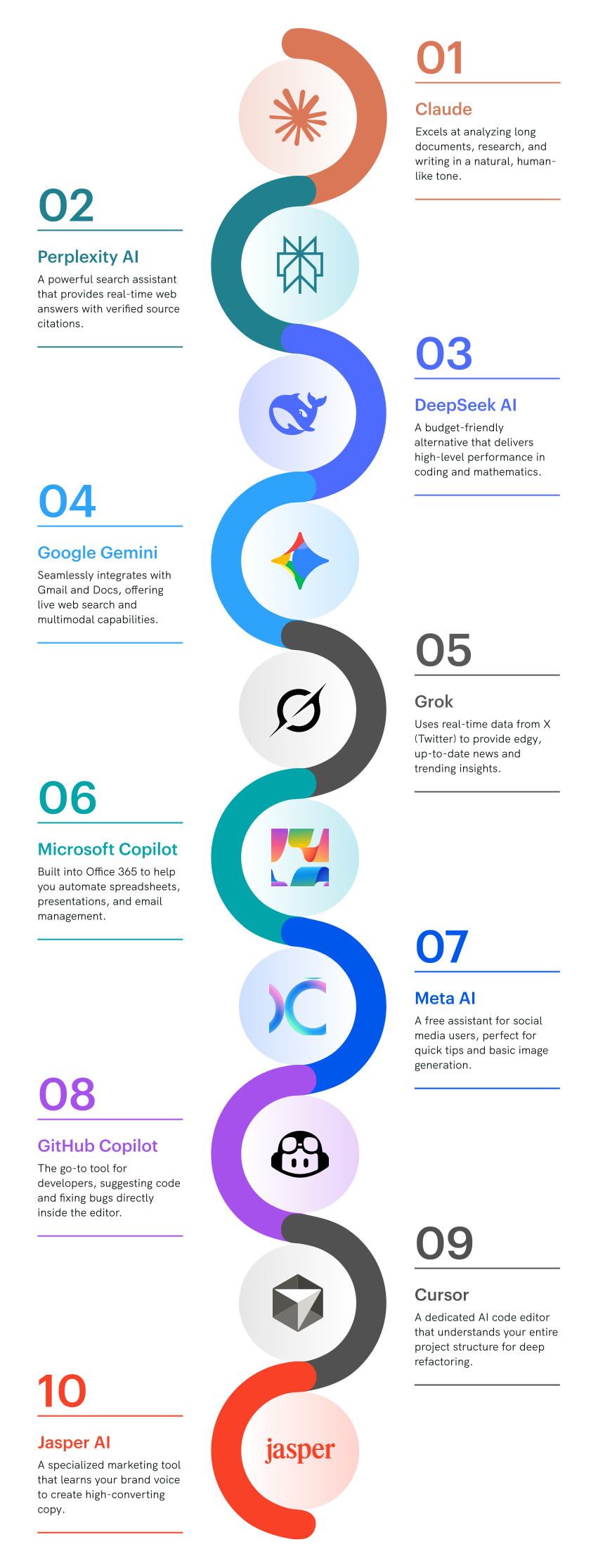
Top 30 ChatGPT Alternatives
Claude

Who it is best for
Claude works especially well for people who deal with long or complex material like research reports, detailed feedback on drafts, complicated logic or large codebases. Claude will read very long documents in a single session. Work with legal files, technical documentation, or large blocks of text? Claude is a smart choice. It also differs in its more natural writing. And it is less likely to block harmless requests compared to some other tools.
Pros
- Handles large context without losing track of earlier conversation
- Gives thoughtful, structured answers to complex questions
- File uploads and document analysis work smoothly
- Generous free plan for most users
Cons
- Slow response times for simple questions
- Over-explains when you need brief answers
- No built-in image generation
- Web search exists but unreliable
- Not always responses to legitimate questions
Cost and Pricing Models
Claude offers a free plan that includes access to its main model with reasonable daily limits, which is enough for many users. The Pro plan costs around $20 per month. It increases usage limits and gives priority access during busy periods. Team and enterprise plans are available.
Perplexity AI

Who is it suitable for
If you are a researcher and need current information with sources, it’s just for you. It can also be useful for students writing papers. Journalists fact-checking on tight deadlines. Anyone frustrated by ChatGPT’s outdated knowledge and vague answers. Perplexity searches the web in real time and drops citations right in the response. No begging for sources. No made-up links. It pulls from actual websites and tells you where everything came from.
Pros
- Automatically cites sources with every answer
- Searches the web in real time for up-to-date information
- Clean interface focused on research and facts
- Free plan allows a reasonable number of daily searches
- Mobile app works as well as the desktop version
Cons
- Not well-suited for creative writing or brainstorming
- Answers can be too brief for complex topics
- No uploading of documents or files
- You can’t generate images
Cost and Pricing Models
The free plan gives you limited searches daily. If it’s not enough, you will need to pay $20 monthly for a Pro plan. It unlocks unlimited searches, access to GPT-4 and Claude models, file uploads, and API credits. No team or enterprise tiers yet.
DeepSeek AI

Who is it suitable for
Developers who need solid coding help without the premium price tag. People in countries where other AI tools are blocked or expensive. Anyone running lots of queries who can’t afford twenty-dollar monthly subscriptions. Students learning to code on a budget. DeepSeek handles programming tasks surprisingly well for something this cheap. The math and reasoning capabilities beat what you’d expect at this price point.
Pros
- Extremely cheap compared to Western alternatives
- Strong performance on coding and technical tasks
- Fast response times even on free tier
- Multiple programming languages
- No arbitrary content restrictions on technical queries
Cons
- Creative writing reads like a manual translated badly
- Misses references and context from Western culture
- Poor interface and customer support
- Documentation makes you guess half the time
- Your data goes to Chinese servers
- No web search, stuck with old training data
Cost and Pricing Models
The free plan offers high daily limits for most users. API pricing is 10 times cheaper than GPT-4. Pro subscription runs about $10 monthly. No team plans or enterprise options.
Google Gemini

Who is it suitable for
If you already use Google tools every day, Gemini is your option. You can ask questions about files without downloading or moving them between tools.
Pros
- Works inside Gmail, Docs, Drive without exporting files
- Handles images, video, and text in one conversation
- Free tier actually lets you do things
- Searches Google live for current information
- Fast even when everyone’s online
Cons
- Says no to normal questions constantly
- Filters kill conversations over nothing
- Pushes Google results even when better sources exist
- Wants every permission on your Google account
- Creative writing has zero personality
Pricing
The free plan includes reasonable usage limits. The Advanced plan costs around twenty dollars per month and offers extra storage, and deeper Workspace integration. Business plans start at $30 per user per month and require an existing Workspace subscription. There is no low-cost team plan for smaller groups.
Grok

Who is it suitable for
It is much less restrictive for sensitive topics and allows more open conversations without constant pushback. It is especially useful for people following markets, trends, or public opinion, because it pulls directly from X’s real-time feed. That means you see what people are actually talking about right now, not filtered or outdated summaries.
Pros
- Direct access to real-time X posts and trending topics
- Minimal content filtering compared to competitors
- Sarcastic, less corporate tone in responses
- Fast at analyzing what’s happening on X right now
Cons
- Only available to X Premium subscribers
- Trained only on X’s userbase
- Not really useful outside X-related queries
- No document analysis or file uploads
- Accuracy suffers from relying on social media posts
Cost and Pricing Models
Requires X Premium subscription at $8 monthly for basic access. Premium Plus at $16 monthly. No standalone option exists outside the X ecosystem. Can’t buy Grok separately even if you wanted to. Enterprise pricing not publicly available yet.
Microsoft Copilot

Who is it suitable for
If Microsoft tools like Word, Excel, Outlook, Teams run your work life, Copilot makes sense. It works well for teams that want AI without leaving their workspace or uploading files to random sites and for students with school Office accounts who need help with assignments.
Pros
- It’s built into most Microsoft tools
- Create slides and spreadsheets from prompts
- Company data is kept inside internal systems for businesses
- Free access through Bing and Edge
Cons
- Limited free version
- Pushes Bing results
- You need a Microsoft 365 subscription for full features
- Heavy interface and messy document formatting
Pricing
Free through Bing and Edge with limited features. Copilot Pro costs around twenty dollars per month for individuals. Business plans start at about thirty dollars per user per month on top of Microsoft 365, with no cheaper team option in between.
Meta AI

Who is it suitable for
Spend a lot of time on Facebook, Instagram, or WhatsApp? Go for Meta AI. It offers help with quick questions, simple research, writing captions, or creating basic images. No signing up, app downloads, and it’s free.
Pros
- Built into Facebook, Instagram, WhatsApp, Messenger
- Completely free with no usage caps
- Creates images directly in chat conversations
- No separate account or app needed
Cons
- Falls apart on anything complicated
- Constantly tries to sell you Meta stuff
- Your actions are controlled by Meta
- Poor image quality
Cost and Pricing Models
Once you have access to Facebook, Instagram, or WhatsApp account, Meta AI is at your disposal for free.
GitHub Copilot

Who is it suitable for
Developers who code for a living. Students learning programming who qualify for free access. Anyone sick of Googling syntax and copying from Stack Overflow fifty times a day. Works inside VS Code, Visual Studio, and other editors you already use. Suggests code as you type instead of making you ask in a separate chat window.
Pros
- Lives in your code editor, not another app
- Suggests complete functions as you type
- Understands your project’s context and style
- Supports dozens of programming languages
- Explains code and finds bugs inline
- Free for students and open source maintainers
Cons
- Suggests wrong code confidently sometimes
- Can leak patterns from its training data
- Costs add up if you have many developers
- Privacy concerns about code being sent to servers
- May suggest outdated methods
Cost and Pricing Models
$10 a month for an individual plan, $19 for a business. Enterprise should be discussed individually. Free for verified students, teachers, and maintainers of popular open source projects. Comes with a limited free trial to test it first.
Cursor

Who is it suitable for
Developers who want an AI that actually understands their whole project, not just the current file. People building real products who need more than autocomplete. Teams frustrated with the limits of GitHub Copilot. Cursor is a code editor built around AI from the ground up. It reads your entire codebase and suggests changes that work across multiple files, not just single lines.
Pros
- Understands entire codebase, not just current file
- Edits multiple files at once for connected changes
- Chat references your actual code automatically
- Lets you choose between GPT-4, Claude, or other models
- Predicts what you’re about to code surprisingly well
- Built-in terminal and debugging tools
Cons
- You have to learn a new editor
- Very expensive
- Frequent crashes
- Not for massive projects
- Can’t code on your phone
- Few plugins
Cost and Pricing Models
The free option offers basic features. Pro costs $20 monthly. Business plan runs $40 per user monthly with team features and admin controls. Two-week free trial includes full Pro access. Annual subscriptions knock off about 20%.
Jasper AI

Who is it suitable for
Marketing teams churning out blog posts and ad copy. Content agencies juggling multiple clients. Social media managers who need captions and posts fast. E-commerce stores write hundreds of product descriptions. Jasper focuses entirely on marketing content, not coding or research. It knows SEO, brand voice, and how to write stuff that’s supposed to sell things.
Pros
- Templates for every marketing format you can think of
- Remembers your brand voice across all content
- Built-in SEO tools and optimization suggestions
- Team collaboration features actually work
- Integrates with Surfer SEO and other marketing tools
- Chrome extension works on any webpage
Cons
- Too expensive for individuals
- Very generic output
- Steep learning curve
- No coding or technical capabilities
- The trial is short and requires a credit card upfront
Cost and Pricing Models
Plans start at $49 per month for individual creators with a word limit. The Pro plan is $69 per month. Business plans start at $499 per month for teams. There is no free plan.
Vertex AI

Who is it suitable for
This isn’t for casual users asking questions. It’s for building and deploying AI systems at scale. And it’s really helpful for data scientists, enterprise developers who need production-grade machine learning infrastructure. Good if you are already running everything on Google Cloud. Teams that want to train their own models instead of using off-the-shelf chatbots.
Pros
- Lets you use several AI models in one place
- You can train models on your own data instead of starting from scratch
- Works just as well for small tests as it does for very large projects
- Connects easily with other Google Cloud tools
- Built with enterprise security and compliance in mind
- AutoML helps teams without deep data science skills get started
Cons
- Hard to use for ordinary people
- You need at least basic Google Cloud experience
- The documentation is written mainly for engineers
Cost and Pricing Models
Just usage-based billing – pay for what you use only. Basically, it’s about $0.50 per 1,000 requests. Training your own models runs roughly $3–10 per hour. AutoML costs more, but it saves time and effort. New users get $300 in free credits for 90 days. Enterprise support starts at around $400 per month.
Amazon CodeWhisperer

Who is it suitable for
Good for developers and teams building on Amazon’s cloud and writing code that connects to AWS services. People who want basic coding help without paying for another tool.
Pros
- Free for solo developers forever
- Knows AWS services inside and out
- Catches security problems automatically
- Works in VS Code and other editors you use
- No usage limits even on free version
Cons
- Pretty weak outside AWS stuff
- Generic suggestions for normal code
- Shows you when it copied from open source
- Supports fewer languages than Copilot
- Amazon keeps your code for training
- Paid version costs the same as alternatives
Cost and Pricing Models
The individual version is free, period. Professional costs $19 per user monthly for team features and admin stuff. No caps either way. Free doesn’t even need a credit card.
Notion AI

Who is it suitable for
People who organize their entire life in Notion. Teams using Notion for docs, wikis, and project management. Students taking notes and writing papers in Notion already. Content creators who plan everything in Notion databases. If you don’t use Notion much, this AI makes no sense. It only works inside Notion pages.
Pros
- Lives right in your Notion pages, no switching apps
- Summarizes meeting notes and long documents fast
- Writes and edits without leaving your workspace
- Understands context from other pages in your workspace
- Decent at generating ideas and outlines
Cons
- Useless if you don’t already use Notion
- Costs extra on top of Notion subscription
- Can’t compete with ChatGPT or Claude for complex tasks
- Limited to what works inside Notion’s format
- No standalone access outside Notion app
- Adds up fast for teams
Cost and Pricing Models
$10 per member monthly when billed annually, $12 monthly otherwise. Free Notion users still have to pay for AI. There’s no free trial for AI features. Cancel anytime but no refunds on annual plans.
IBM Watsonx

Who is it suitable for
Big companies with compliance requirements and legal departments that approve nothing. Enterprises already locked into IBM contracts. Industries like healthcare and finance where regulations matter more than speed. Organizations that need AI but can’t send data to OpenAI or Google servers. If you’re a solo developer or small startup, this is massive overkill and way too expensive.
Pros
- Enterprise security and compliance certifications
- Deploy on your own servers to control data
- Models can be fine-tuned on proprietary data
- IBM support included with enterprise contracts
- Meets regulatory requirements for sensitive industries
Cons
- The tool is too overpriced for such quality
- Interface is old and setup – complicated
- Documentation is not written for developers
Cost and Pricing Models
There’s no information about pricing in public. It’s hidden in custom enterprise contracts. But don’t expect cheap fees. Small pilot projects might start around $10,000. Full deployments run hundreds of thousands. IBM sales team handles all quotes.
Phind
Who is it suitable for
Developers debugging code at 2am. Students learning programming who need better explanations than Stack Overflow. Anyone searching for technical answers who’s sick of wading through blog spam.
Pros
- Multiple search sources and cites them automatically
- Good for technical questions
- Actual code examples from documentation
- Fast responses with no SEO garbage and blog spam
Cons
- Bad for creative writing or general conversation
- You might be offered outdated solutions
- Limited to programming and tech topics
- No file uploads or document analysis
- Poor interface
Cost and Pricing Models
Free unlimited basic searches. Pro plan costs $20 monthly. Annual subscription is $15 monthly. No team or enterprise plans yet.
Zapier Agents

Who is it suitable for
Firstly, it’s a good match to people who already automate workflows with Zapier. Juggling repetitive tasks across different apps? Tired of copying data between tools manually? This AI will do things instead of just answering questions. Zapier Agents connect your apps and execute tasks, not just chat about them.
Pros
- Actually takes actions across your connected apps
- Works with 6,000+ apps supported by Zapier
- Automates multi-step workflows without coding
- Learns patterns from your existing Zaps
Cons
- Can unpredictably break
- Requires existing Zapier knowledge to use well
- Can misunderstand and mess up workflows
- Not smart enough for complex decision-making
Cost and Pricing Models
Requires a paid Zapier account first, which starts at $30 monthly. Agents cost extra, pricing varies by usage and isn’t publicly posted yet. Early access through waitlist. Expect it to cost similar to other automation add-ons once fully released. No free tier for Agents even if you have free Zapier.
Pi.ai

Who is it suitable for
People want a friendly chat without an agenda. Anyone lonely who needs someone to talk to without judgment. Users are tired of AI that sounds like a corporate robot. People processing feelings or thinking through decisions out loud. Pi is designed for conversation, not tasks. It’s more like talking to a supportive friend than asking a search engine question.
Pros
- Actually feels like talking to a person
- Remembers previous conversations naturally
- Non-judgmental and emotionally supportive
- Completely free with no usage limits
- Available as voice calls, not just text
- Simple interface with zero clutter
Cons
- Terrible at factual questions or research
- Can’t help with work tasks or coding
- Sometimes too agreeable, and repetitive
- Want productivity? Not here
Cost and Pricing Models
It’s 100% free. There are neither paid tiers nor ads. It’s funded by Inflection AI. Just sign up and talk as much as you want.
Otter

Who is it suitable for
Stuck in meetings all day? Can’t take notes fast enough? It’s for you. It also suits students recording lectures and interviews. Journalists transcribing hours of audio. Remote teams on Zoom calls who need accurate records. Otter transcribes live and recorded audio automatically. It’s not a chatbot where you ask questions. It turns speech into searchable text.
Pros
- Transcribes meetings in real time accurately
- Integrates with Zoom, Teams, Google Meet
- Identifies different speakers automatically
- Searchable transcripts save hours rewatching recordings
- Generates summaries of long meetings
- Mobile app records and transcribes on the go
Cons
- AI chat feature is weak compared to ChatGPT
- Struggles with heavy accents or background noise
- Free tier runs out fast with long meetings
- Privacy concerns about recording other people
- Export options limited on the free plan
- Summaries miss nuance and context sometimes
Cost and Pricing Models
Free option with transcription minutes limits. The basic plan is $17/month. Pro – $30 monthly. Business runs $40 per user monthly with admin controls. Annual billing saves about 20%. A credit card is required even for the free tier.
Copy.ai

Who is it suitable for
Good for marketing teams, freelancers, and sellers. Need quick posts and ads? Lots of client copy? Many product descriptions? It will create short marketing text like captions, ads, and headlines.
Pros
- Templates for ads, emails, and social posts
- Tone and style options fit different brands
- Chrome extension works anywhere
Cons
- Terrible at long-form content
- Limited creativity compared to human writers
- No SEO tools or content optimization
Cost and Pricing Models
2000 words in a free plan. Unlimited words are included with Pro at $49 per month. The team plan for 5 seats costs $249. Enterprise pricing is custom. Annual billing saves 20-30%. Seven-day money-back guarantee, but a credit card is required upfront.
Writesonic

Who is it suitable for
Bloggers, SEO specialists, and small marketing teams who need affordable long-form writing.
Pros
- Handles long articles, full blog posts
- Built-in SEO optimizer and keyword tools
- Included Chrome extension and WordPress plugin
- Image generation built in with credits
Cons
- Credits system is rather confusing
- Customer support slow to respond
- Plagiarism checker costs extra
Cost and Pricing Models
Free trial gives 10,000 words at once. Unlimited plan starts $20 monthly for one user with GPT-4 access. Business runs $19 per user monthly when billed annually. Enterprise is custom pricing. Uses a credit system instead of simple word counts. Credits vary by AI model quality. Gets expensive fast if you want best output quality.
Elicit

Who is it suitable for
Academic researchers, scientists and anyone who needs to understand research papers fast without reading hundreds of them. Elicit searches academic databases and summarizes findings. It’s built specifically for scientific research, not general questions.
Pros
- Searches across millions of academic papers
- Creates quick summaries of long studies
- Tables, methods, and key results are generated automatically
- Scientific language and terminology are not a problem
Cons
- Not for general writing, coding, or everyday tasks
- Good only for English research
- Review and verification is still required
Cost and pricing
They offer a free basic plan. Plus costs about $10 per month and gives more credits and features. Pro is $42. Pricing is credit-based.
Midjourney

Who is it suitable for
Artists needing concepts yesterday. Content creators making thumbnails and graphics. Game devs sketching character ideas. Anyone who wants AI art that doesn’t look like garbage. Midjourney crushes DALL-E on quality. Runs through Discord only, which is annoying.
Pros
- Makes genuinely beautiful images
- Consistent style
- Useful prompts from the community
- Weekly updates and improvements
- Easy to tweak and remix results
Cons
- Discord only, no normal website
- Prompts take practice to get right
- No free version at all now
- Your images are in free access
- Can’t write text inside images
Cost and Pricing Models
Basic costs $10 monthly for 200 image generations. Standard runs $30 monthly for unlimited generations in relaxed mode. Pro is $60 monthly for more fast hours and stealth mode. Annual billing saves 20%. No free trial. All plans include commercial usage rights. Fast mode uses limited hours, relaxed mode queues your requests.
Google Veo

Who is it suitable for
Video creators testing concepts before expensive shoots. Marketing teams making quick video ads. Content creators who need b-roll footage. Filmmakers storyboarding scenes. Veo generates video from text prompts, not just images. Still experimental and limited access, but it’s one of the few serious AI video tools available.
Pros
- Generates realistic video clips up to a minute long
- Better motion and physics than most competitors
- Understands complex scene descriptions
- Can extend and edit existing video clips
- Higher resolution than early AI video tools
Cons
- Waitlist only, not publicly available yet
- Generated videos still look slightly off
- Can’t control everything precisely
- Renders take forever compared to images
- Limited to short clips, not full videos
- Expensive compute costs once it launches
Cost and Pricing Models
Pricing is not publicly available yet. You can only get an invitation through Google Labs.
Fathom

Who is it suitable for
Sales teams, account managers, and recruiters can benefit from this tool. Fathom suits anyone in meetings where missing details cost money. It will record video calls and generate summaries automatically.
Pros
- Unlimited recordings and transcripts free
- Integrates with Zoom, Meet, Teams seamlessly
- Auto-highlights action items and key decisions
- Syncs notes to CRM systems automatically
- Searchable library of all past meetings
Cons
- AI summaries miss nuance sometimes
- Only works for video calls, not in-person
- Privacy issues recording clients without clear consent
- Limited editing options for transcripts
- Weak mobile experience
- You need decent audio quality
Cost and Pricing Models
Free for individuals. Team plan – $19 per user monthly with admin controls and integrations. Enterprise pricing is custom.
Canva Magic Studio

Who is it suitable for
Great choice for people involved in marketing, creating posts, designing. Social media managers, small business owners, and content creators. Magic Studio AI tools inside Canva will help you generate images, remove backgrounds, and edit designs.
Pros
- You need only Canva, no extra tools
- Quickly creates images from text, removes backgrounds
- Lets you erase small mistakes from photos easily
- It’s easy even if you are not a designer
Cons
- Image quality is weaker than dedicated AI art tools
- Not as powerful as Photoshop or Midjourney for advanced work
- Requires a paid Canva plan for full access
- Generation credits run out quickly
- Can’t match professional design software
- Features locked behind highest tier plans
Cost and Pricing Models
Free Canva includes some Magic Studio features with limits. Canva Pro costs $15 monthly for one person with more AI credits. Teams plan runs $10 per person monthly when billed annually. Custom enterprise pricing.
Warp
Who is it suitable for
Warp is designed specifically for developers, DevOps engineers, and data scientists who want a more intuitive command-line experience. It’s perfect for those who find traditional terminals clunky and want a tool that feels more like a modern code editor (like VS Code) rather than a 1970s mainframe.
Pros
- Integrated AI Command Search: Convert natural language into complex shell commands instantly.
- Block-Based Interface: Treats terminal output as discrete blocks, making it easy to copy or share specific command results.
- Modern Editing: Support for mouse positioning, intuitive keybindings, and smart autocomplete.
- Warp Drive: A collaborative space to save and share frequently used workflows with your team.
- High Performance: Built with Rust and GPU acceleration for a smooth, lag-free experience.
Cons
- Mandatory Account Login: Requires an internet connection and an account to access most features.
- OS Limitations: Currently available for macOS and Linux, with no native Windows version yet.
- Privacy Concerns: Some users are wary of a terminal that connects to the cloud for AI and sync.
- Closed Source: Unlike many traditional terminal emulators, the core engine is proprietary.
Cost and Pricing Models
Free tier is generous for individuals, offering basic AI features and Warp Drive for up to 3 users. Team plan costs $15 per user/monthly, providing unlimited AI requests and shared team drives. Enterprise pricing is custom, adding SSO and advanced security features. Annual billing typically offers a 20% discount.
Suno

Who is it suitable for
It was created to work with music. Musicians, podcasters, and hobbyists will surely find it very useful. It generates complete songs from text prompts, including vocals, instruments, and lyrics.
Pros
- Creates full songs with vocals and instruments
- Multiple genres from rock to classical
- Generates lyrics or uses your own words
- Download and use commercially on paid plans
- Songs actually sound coherent and musical
Cons
- Can’t fine-tune specific instruments precisely
- Vocals sometimes sound slightly robotic
- Limited control over song structure
- Credits burn fast on free tier
- Copyright questions still murky for AI music
- Can’t replicate specific artist styles legally
Cost and Pricing Models
Free gives you 50 credits monthly, about 10 songs. Pro costs $10 monthly for 500 credits and commercial rights. Premier runs $30 monthly for 2,000 credits. Annual billing saves roughly 17%. Each generation uses 5 credits. Extended songs cost more credits. Downloads and commercial use require a paid plan.
AdCreative.ai

Who is it suitable for
Running ads constantly? AdCreative handles it. Marketing teams, E-commerce shops. agencies, startups. AI will make ad visuals and copy for Facebook, Google, Instagram. That’s it. That’s what it does.
Pros
- Spits out ads sized right for each platform
- Guesses which ones will perform before you spend money
- Cranks out variations for split testing fast
- Plugs into your ad accounts to see what actually works
- Gets smarter by watching your winners
Cons
- Everything looks templated until you customize it
- Pricing hurts if you’re solo
- Takes time to learn compared to Canva
- Useless if you’re not running paid ads
- Predictions miss sometimes
- Needs decent product shots to work with
Cost and Pricing Models
Starter costs $29 monthly for 10 credits (brand identities). Professional runs $59 monthly for 25 credits. Ultimate is $119 monthly for 100 credits. Agency pricing custom for white-label needs. Annual billing saves about 20%. Credits determine how many brands you can create ads for. Seven-day free trial with limited features.
HubSpot AI

Who is it suitable for
Sales and marketing teams are already drowning in HubSpot. Companies using HubSpot CRM who want AI without switching platforms. Content marketers manage blogs, emails, and social media from one place. Businesses that paid for HubSpot and want to squeeze more value from it. The AI tools only work inside HubSpot’s ecosystem, nowhere else.
Pros
- Built into tools you’re already using daily
- Writes emails and social posts from CRM context
- Generates blog content with SEO suggestions
- Understands your contacts and deals automatically
- No extra login or platform to learn
Cons
- Requires expensive HubSpot subscription first
- AI quality weaker than ChatGPT or Claude
- Limited to HubSpot’s specific use cases
- Can’t use it outside HubSpot platform
- Adds cost on top of already pricey plans
- Generic output needs heavy editing
Cost and Pricing Models
Not sold separately. Comes with certain HubSpot tiers or as add-on. Professional plans start at $800 monthly minimum. AI features cost extra on lower tiers. Enterprise includes more AI capabilities, starting $3,600 monthly. Pricing depends on contacts, users, and features. Small businesses priced out quickly.
ELSA Speak

Who is it suitable for
Non-native English speakers working on pronunciation. Professionals preparing for presentations in English. Students studying for English proficiency exams. Anyone whose accent causes misunderstandings at work. ELSA uses AI to analyze your speech and fix pronunciation problems. Focuses purely on speaking skills, not grammar or writing.
Pros
- Analyzes pronunciation at the phoneme level
- Gives instant feedback on specific sounds
- Tracks progress over time with metrics
- Personalized lessons based on your accent
Cons
- Helps only with speaking
- Repetitive with pronunciation drills
- Focuses mainly on American English, limited accent options
- No human interaction or conversation practice
Cost and Pricing Models
You can get basic lessons in the free version. If you need Pro you are to pay $12 monthly or $100 annually. Premium – $500 lifetime. 7-day free trial of Pro features.
FAQ: Best ChatGPT Alternatives
Keep in mind that free plans can hit your credit card once the trial’s over. Most users choose Claude’s free tier. Those who live in Google’s ecosystem turn to Gemini. Doing research and need sources that aren’t made up? Perplexity’s your answer. Pick based on what you’re doing, not what sounds best.
Stuck with coding? GitHub Copilot is hard to beat. If you want something that can refactor or edit multiple files at once, Cursor is a stronger choice. AWS is your home? Amazon CodeWhisperer will do. And if you just need quick answers when you’re stuck, Phind is fast, simple, and gets you back to work without friction.
Grok filters less than most competitors but requires X Premium subscription. Claude handles nuanced topics better without constant refusals. Most “unfiltered” options are sketchy or unreliable. Be realistic about why you want fewer restrictions. Legitimate use cases exist, but so do tools that enable harm.
Perplexity built its entire platform around research with automatic citations. Elicit specializes in academic papers and scientific literature. Google Gemini searches effectively if you need general information fast. All three beat ChatGPT for finding and citing current information.
Depending on what your goals are, you could choose Claude or Jasper, or Copy.ai. More natural, nuanced writing goes with Claude. Jasper and Copy.ai focus on marketing copy. For fiction and storytelling, Claude handles character development and plot better. Most alternatives still need heavy editing though.
Midjourney is more expensive but much better than DALL-E in quality. Canva Magic Studio works fine for social posts when you’re already designing there. For video, we would recommend Google’s Veo.
It’s clearly Microsoft Copilot built into the tools people already use. No copy and paste content between apps is required. If you work mostly in Notion, Notion AI can be useful too, but it does not help you anywhere else.
What do you mean by privacy? Claude claims not to train on your conversations. DeepSeek sends data to Chinese servers. Self-hosted options like local models give you full control but require technical knowledge. Read privacy policies before dumping sensitive info into any AI tool.
Claude can work with really long content, even entire books. So does Gemini. ChatGPT is limited to around 128,000 tokens. It’s important if you’re feeding it massive documents or long conversations. Most people never hit these limits anyway.
Not all AI tools must cost you a fortune. Free versions may be the right choice once they meet your needs. And in practice, some of them do a good job. DeepSeek costs almost nothing compared to US options. Students can use Copilot and CodeWhisperer for free.
Conclusion
ChatGPT shouldn’t be underestimated. It opened the door to the AI world and did a lot of good. But it doesn’t mean you must stick to it forever. Better options exist for almost every specific use case. The right choice depends on what you’re actually doing. Test the free tiers before paying. Most tools let you try enough to know if they’re worth it. Don’t assume expensive means better or that ChatGPT’s name recognition equals superior performance.
Technology moves fast. New alternatives launch constantly. What works today might get beaten next month. Stay flexible and switch when something better shows up.Need help choosing the right AI tools for your specific workflow? We test and compare these platforms so you don’t waste time on tools that don’t deliver. Reach out and we’ll point you toward what actually works for your needs.


